Ben's take on gadgets, technology... life

AvatarWhen memory is placed online, it's for LIFE

Showing posts with label tech. Show all posts

Google Sync has arrived for the iPhone, Nokia & other Exchange Server enabled devices!

Whether you own an iPhone, a Nokia, a Windows Mobile Device or anything at all that supports Microsoft Exchange Server, you'd be pleased to know that Google - our best friend who offers tonnes and tonnes of things for free has added YET another FREE service - Google Sync!
Google-Sync-logo

This is by far one of the most exciting things Google has announced this month!

What does it mean to a lay person?
Imagine your phone's calendar and contacts constantly backed up at a secure location while e-mail is pushed to your phone EXACTLY like the high and mighty 'BlackBerry' push service. Best part is, IT'S FREE!

Imagine a world where you will KNOW that your precious contacts and calendar entries are constantly backed up to your phone and e-mails come in the instant someone sends you something. Lost phone? Dead phone? No problem! Just sync it back from Google and everything returns!

With everything backed-up at Google's server, if you ever need to review your schedule, update your phonebook entries or check your mail - just go to gmail.com. It's all there! and changes made are automatically 'pushed' to your phone. Isn't technology just AWESOME?

If those words were too much for you, here’s a video that explains it all…

What's the catch then?
Okay, before you do double back flips and start singing "The hills are ALIVE! with the sound of MUUUSICCC" - here's the reality, this is the kind of service some companies charge 10-15 USD a month for - Google offers it for FREE so long as you use Gmail or Google Apps (for your mail hosting).

The only thing is, just like any Push mail service, you'd need some form of a data plan for your phone - this ranges from 50 - 100 ringgit monthly depending on your network operator - it's the data charge that will cost you (mind you again, Google is not making from this).

As long as you've got a Data Plan that provides you with sufficient data transfer monthly, you'll be fine.

Great! I've got a Data Plan and I'm ready! What's next?

If you own a Nokia...
From my experience, most of the new N-series and E-series phones from Nokia come with "Mail for Exchange" - an application which supports the Exchange Server. If you don't have it, download from Nokia Business

mail_exchange_nokia_12

More detailed instructions here


If you have an iPhone...
The software is already in your phone. Just startup your mail app - when prompted to select type of mail DO NOT select "Gmail" - select "Microsoft Exchange" instead.

image
More detailed instructions here.


If you have a Windows Mobile device (HTC etc)...
The software is already installed. The app you'll use is called ActiveSync. image
More detailed instructions here.


Final word… The drawbacks...

  1. In this world, nothing is absolutely FREE. You need to subscribe to a Data Package from your network operator in order to use it as mentioned.
  2. Most phones support a maximum of 1 Exchange account. So if you've got corporate mail on your phone using push, I'm afraid it's not going to work.

Well, enjoy the world of Push! and THANK YOU Google! You ROCK!

I make pictures SEXY!

Sure, the iPhone doesn't have the BESTEST camera in the world. Being a Nokia user, I've been pampered with mostly a 5 megapixel camera world. Then the iPhone came around, 3 megapixels, ZERO flash... I thought to myself... geez, could that be the down fall of the iPhone?

Looks like I was wrong...

One of the beauties of the iPhone is the fact that there are literally tonnes and tonnes of applications to be downloaded that will 'better' your phone. Want flash? No problemo! Download "Flash For Free"
. Works well... I mean I'd be kidding you to say that it's a Flash replacement but hey, it helps!

Then lately, I discovered this app called ColorSplash - WOW! this app is just amazing! Checkout some of the things I've been able to do to regular pics taken through the phone!

Japanese leaf...

From Blog Pictures

A sexier Japanese leaf...

From Blog Pictures

Boring cup of ice ocha...

From Blog Pictures

Boring no more!

From Blog Pictures

Amrita, our beloved Producer

From Blog Pictures

Turned into a sunglasses model...

From Blog Pictures

Plus HAIR! Fooiyoh!

From Blog Pictures

Like that's not enough... my hunt went on to download more apps from the AppStore... it's just too addictive! It was then that I found... "Pano" - check. this. out.

From Blog Pictures

Let me remind you again... all the pictures here were taken through a 3.0 megapixel camera phone and altered on the phone itself... :)


GPS Navigation for iPhone lands in Malaysia, Singapore, Thailand - it's Sygic!

The exhaustive review
I've been using GPS navigation systems for a while now. From the early days of my first Garmin Street Pilot to Garmin Nuvi 610, Garmin Mobile XT for Nokia & Windows Mobile devices, Nokia Maps and today... I'm proud to say I've embarked on yet another GPS journey. This time... on the iPhone 3GS - not using the Google Maps application BUT the first ever Turn-By-Turn GPS Navigation covering South East Asia called Sygic!


This is one area which the iPhone never really excelled... in fact, it never touched simply because the SDK provided by Apple didn't allow for such functionality. Since the release of OS 3.0 - this is now possible. After some research, I discovered that Sygic isn't exactly a new player - in fact, the company has been around since 2002.

The Installation Experience
Installing Sygics GPS Navigation software was quite straight forward. No codes to enter, no special procedures to go through. You can only purchase application via iTunes as the app is over 200 megabytes - something that the AppStore on the iPhone wouldn't be able to do. It took a little over 45 minutes on my Streamyx connection and voila! - loaded straight into the iPhone. Completely painless.

Interface
I'm a man of aesthetics. It's gotta look good and of course be a pleasure to use and I must say, aesthetics wise, Sygic has outdone itself! As with any iPhone app, it always looks great. Simple big buttons for big fingers, interface is hardly cluttered and most importantly, it's REALLY REALLY fast!

Usability
If you have used GPS devices before, whether its a Garmin or one by Mapking or any other manufacturer, the concept is pretty much the same but through my experience with Garmin products, there's only 1 thing which I'd like to point out. That's searching for Point-of-interests (POI).
  • The Garmin Model
    Garmin's model of searching of Points of Interest like Ikea etc is by selecting the "Food, Hotels..." POI option, selecting a sub category and search! The search expands from your current location all the way to all other available maps / regions installed into your Garmin. So once search searches literally the WORLD! I LIKE!
  • The Sygic Model
    Sygic however has a slightly different model. Sygic starts by asking if you're searching for a POI in your current position or in another country -> city. After which, you can pick the subcategory of POI (similar to Garmin) followed by a search. The only problem with this in my opinion is there are times you might not know the actual city your POI is in and so you might never find your POI.
That said however, I've spoken to Sygic's customer support and they are now aware of this. If they do update the app, it's great news for us as upgrading the app itself is FREE! more on this later...

Navigation
Here is where Sygic really excels. I've taken Sygic for a couple of runs from KL to Cameron Highlands and to the main city centre with no problems. At one point, I needed to look for a car service centre in Cheras and guess what? I found it!

Never have I come across a GPS solution for mobile cellular devices that comes packed with features that are mostly available on high-end standalone GPS devices!

  • Lane Assist in Sygic
    I personally found lane assist to be a really useful feature as during navigation there can be many intersecting roads, many junctions, many splits... lane assist just sorts it out!
  1. Let's you know when sign boards are coming up - even shows the signboard on your display - making sure you are on the right lane
  2. Tells you how many lanes are there and which EXACT lane to use
  • Speed limit for most major roads built-in
    Another feature worth mentioning is that the maps come programmed with speed limits of most major roads you're on. Once you're above the limit, Sygic can be set to give you a visual or audible alert.

  • Fully configurable navigation
    Apart from the the human-like navigation voice in possibly every language you can think of, Sygic has some interesting navigation options...
  1. Feel like going on only toll-free roads today?
  2. No U turns?
  3. Want a more economic route?
  4. Want a faster route?

    It's all possible!
Maps provided by TeleAtlas
The map Sygic provides is by one of the largest mapping companies in the world called TeleAtlas - the same company Google uses for Google Maps. You can imagine the same level of detail and accuracy. Most if not all common POIs that have a phone number has been programmed into the map making it extremely useful when looking for phone numbers of hotels, airports, banks, restaurants etc (almost like having yellowpages in your palm!) and of course, being built on the iPhone, a simple tap on the number calls the location.

At the moment, for the South East Asian region, Sygic provides TeleAtlas maps of 3 countries. Malaysia, Singapore and Thailand. All three maps are fully loaded into your device and so you won't incur map download charges while navigating (like how Nokia maps works if you didn't download the maps before hand using Nokia's Map Downloader).

Upgradability
The maps that are provided with the download at the moment is the most current. According to Sygic, there will future map upgrades available at a nominal charge. The price is not yet determined.

Reception
Through numerous tests, Sygic faired extremely well even in environments filled with skyscrapers. What really surprises me is how powerful the GPS sensor was in the iPhone as my car has a fairly strong tint which usually affects GPS reception. Even my full-fledge Garmin Nuvi at times has difficulty getting a GPS lock.

Sygic on the other hand took approximately 20 seconds to lock on to the current position and of course, even faster when placed in non-tinted environments.

The Decision
  • Can Sygic replace your trusted standalone GPS device?
    From what I've seen, Sygic does most if not all of what standalone GPS devices do. If you're not a hardcore GPS user, Sygic would meet your needs.

  • Does it suck up battery life from the iPhone?
    Of course it does but to what extent is the question. From a full charge, I've managed to crank up at least 3 hours of non-stop navigation with voice calls and smses in between.

  • How much does it cost?
    The app as of this writing stands at a promotion price of 70 USD which translates to approximately 250 ringgit. This I think is fair considering the coverage for 3 Asian countries when you pay upwards of 700 ringgit for a standalone GPS unit with only coverage for Malaysia and does not offer this many features.

  • The only thing that nags me...
    Good but not great coverage of POIs
    As far as Point of Interests are concerned, in the Malaysian and Singaporean GPS context, Sygic's partnership with TeleAtlas as a mapping company is good (with most major POIs listed) but not as complete as free community based maps such as that offered by malsingmaps.com for the MapKing and Garmin GPS users.

    One example was that I could find literally every hotel in Penang except for G Hotel but on hindsight, I could find even small and little known chinese coffee shops in the Puchong area!
The Sygic promise
Just like Nokia's policy on their firmware. Sygic has a similar promise. They vow to continue improving the software and continuously provide FREE upgrades via the AppStore. From what I've heard, these are some of the promises in the next release!
  • Integration with iPhone's Phonebook
    Pick a contact, select the address, navigate and Sygic does the rest!

  • Background iPod playback during navigation
    At the moment, iPod playback interferes with voice instructions from Sygic. They tend to jumble up layer on top one another. With the update, music fades off and returns after navigation instruction

  • Enhanced GPS lock
    Well, there's always room for improvement!

    and more!
So, the Golden Question - To buy or not to buy?
If you live in Singapore, Malaysia or Thailand OR if you're visiting any one of these three countries and own an iPhone, this is the only solution available - and I dare say, a very very well thought of one too. Apart from the less complete POI coverage when compared to free community maps, Sygic - with it's well thought out interface and featureset really shines as far as GPS navigation is concerned.

At the promo price of 70 USD, it's one time investment with maps of 3 complete countries is quite a deal. Plus, if it's GPS navigation you crave on your iPhone, your long awaited solution has arrived. Need I say more? :)


The final showdown - Nokia N97 or the iPhone 3GS?


It's been sometime...
So it's been sometime since I've written about mobile phones. Yes, it's true... I now have an iPhone in my life, not like I haven't had one in the past but this time... it's the - 3GS.
Question is, what about my other baby? The N97? How do they compare? Is the iPhone 3GS king? Is the Nokia N97 any competition at all to the 'fruit'? I'm really tired of comparing the two phones. Once and for all, I'm going to lay out cards for both devices.

I've been using the N97 for a good period of time now. 3GS is new but the iPhone OS remains the same - of course with a few tweaks here and there in the 3.0 operating system. So here it goes, the final showdown...

Capability and Hardware
Both the N97 and the iPhone 3GS are very capable phones. Both have autofocus camera built-in, digital compass a.k.a magnetometer, touch screen, 3.5G connectivity etc.

That said however, the N97 has far more superior features
  • the 5 megapixel carl seiz lense is truly unbeatable. The contrast, the sharpness, the quality beats iPhone 3GS' 3.0 megapixel autofocus flat

  • the N97 comes with a removable battery - which has much better battery life compared to the iPhone 3GS

  • comes with a standard 32GB - on board memory

  • comes with an option to expand the onboard memory through a memory card

  • comes with a front facing camera for 3G video calls

  • comes with a physical qwerty keyboard (not exactly essential for all users)

  • Has a higher resolution 360 x 640 (nHD) resolution screen compared to the iPhone 3GS - you see more
Software
Then there's the iPhone 3GS which has none of the above features BUT excels in usability
  • On board video editing with one-touch upload to YouTube (it's a little more complicated on the Nokia)

  • Has one of the best, in my opinion Cut, Copy, Paste and Undo implementation on any mobile device

  • Device wide search a.k.a Spotlight is faster and cleaner compared to Nokia's implementation of the Device Search

  • More fluid, user friendly interface

  • Has an AppStore with over 10,000 applications - there's literally an app for everything! - more on this in my future posts

  • Built on a SOLID OS X platform - it has not hung even once since I turned on the phone
The N97 - how does it fare software wise?

  • Since revision v11 of the N97 firmware, the phone has certainly hung less. I would dare say 1 restart is required every after 1 - 2 weeks of usage. The Symbian S60V5 platform is still not the most stable - that said however, as with all Nokia products, firmwares are periodically released making the phone perform better and sometimes adds additional features to the phone's existing featureset which I'll discuss later

  • Nokia has been in the mobile phone industry way longer than Apple has and so it's no surprise that the pioneer would have the upper hand in mobile telephony software. Nokia's got a HUGE range of featureset as far as mobile phone usage is concerned for instance :
  1. Profiles - Apple doesn't have that. This is extremely useful when you like different settings for different environments, ie. much calmer tones in the office, louder when you're outside etc.

  2. Call Screening - I'd love to have this on the iPhone - when I sleep, I turn on a customized profile which alerts me only when the person calling is in my 'allowed list'

  3. Wake-on-alarm - It doesn't matter if your Nokia is completely turned off. If there's an alarm set, the phone will automatically turn on at the designated time and set-off the alarm

  4. Unlimited call and message log - Nokia allows you to set how much of your call log is recorded and how many sms messages to save - unlike Apple where there is not such setting

  5. Want to send files, photos, songs via bluetooth? No problem - can't do that with the iPhone

  6. Want to send out contact numbers via SMS? No problem - you need to send those contacts via MMS on the iPhone

  7. 3G video call? No problem

  8. Similar to the iPhone, Nokia embarked on the same boat and launched the OVI Store - similar to the AppStore however, because it's still quite young, there aren't many apps available. Those that are there are already quite promising. It's worth a look. I personally love the "Digital Compass" app.

  9. Device-wide search - Searches the entire phone plus SMS messages as well unlike the iPhone which only searches e-mails, contacts, calendar entries and music. This comes in really handy when you're looking for some information you received via sms awhile back - instead of checking one message at a time, just a quick search quickly reveals the information required
Web extensions to the phone

The iPhone 3GS
The one web extension I can think of for the iPhone is the MobileMe service. Which you can subscribe to and synchronize all your calendar and contact entries across all your Macs, iPhones and iPod Touches. The moment you add in a new entry to the calendar, phonebook, it gets uploaded to the server and backed up instantly. Never worry about losing your information ever again!

On the 3GS, with the service, you can even find your lost iPhone. Just logon to the MobileMe website and immediately you'll know where it is along with an option to set off an alarm to the person who took your phone or completely wipe all data to protect your privacy.

The only down side? It costs 329 ringgit per annum.

Nokia's answer - OVI - pronounced as 'ohvaeh'
The OVI service is available to most of the latest Nokia models in the market - including the N97. Does pretty much what MobileMe does - synchronization is not done automatically - simply sync your content to the OVI server with a single click. Once done, you may update your contact entries, put in new calendar entries, notes etc via OVI's website and the next time you sync, it gets pulled straight into your phone!

Best part? It's ABSOLUTELY FREE!

The Nokia Promise
Nokia believes in releasing a phone with a working firmware but vows to continuously improve it by adding more features, make it more efficient through firmware upgrade. Below are some of the promises set for the N97...

  • Kinetic scrolling - similar to the effects of scrolling the contact list on the iPhone but will only release that in the next firmware release- Multitouch support - similar to zooming in and out of pictures on the iPhone using 2 fingers

  • Skype for the N97 - Soon we'll be able to make calls for free via our mobile line's data connection. The iPhone has Skype as well however, voice calls are only restricted to WiFi use only
So in short which is a better phone?
It's really not fair to judge. The iPhone is a really SLEEK phone. Comes with gajillions of apps - which will take Nokia's OVI Store to catch up but only time will tell. Both phones have their advantages and disadvantages.

The said however, one thing is clear, if you are looking for the BEST MOBILE PHONE with the highest quality of components plus all the bells and whistles - the N97 is the answer. If you want the MOST ENTERTAINING and sleekest looking mobile phone - it's the iPhone 3GS.

The verdict is OUT


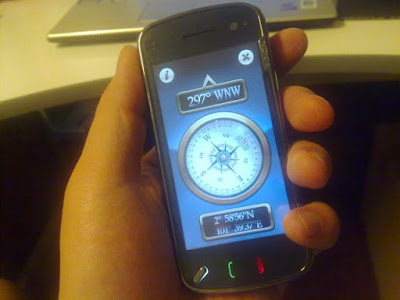
Great applications are underway! Compass for the N97!

The Apple
So we've heard about the Apple iPhone 3GS. The built-in digital compass - or in a more technical term, it's called the magnetometer. As always, Apple will come up with an AWESOME looking app that works with the feature...


Then there's the latest, greatest, Nokia's flagship - N97. The thing is, it's not a national secret. Nokia is good at making phones and the Symbian Series 60 interface (v5) isn't too bad - but can be a little aged compared to the iPhone.

The Nokia
The N97 does come with a magnetometer built-in but doesn't come with a dedicated app like the iPhone so usage of the digital compass was very very very much limited. Unless you use Nokia Maps (Nokia's GPS app) - there's no other way to use the magnetometer.

BUT no fear! OffScreen technologies is here!
Thanks to Nokia's move to create the OVI Store (very much like Apple's App Store)... developers such as OffScreen have been hard at work and somehow brought the iPhone App feel to the Nokia world... so VOILA!


The app works EXTREMELY well! Best part is, it's FREE! So if you own an N97. It's an amazing app. Check it out on the OVI Store. Also, make sure you checkout some of OffScreen's other apps, they've got loads of other apps which work GREAT!

Finally, apps that look great on a Nokia!

Ahha! The iPhone 3GS arrives in Malaysia!

image

Well, at least by means of booking… stock according to Maxis will only be available for pickup on the 31st of July 2009; which in my opinion isn’t too long really, considering the time it took for us to get the iPhone 3G in Malaysia when the entire world was already rejoicing it’s arrival and playing with it for a good 9 months.

From what I gather at www.maxis.com.my/iphone3gs, Maxis has learned from it’s previous experience. Instead of releasing just set of pathetic iValue plans like what they did for the 3G, the 3GS comes with everything – the iData plan, the iValue plan and Prepaid plan (which essentially is no plan at all – just pay a hefty price for the phone and use it).

The prices
As with Apple’s style of pricing, everything tends to come down in price whenever a new model comes about. The iPhone 3G (16GB) model is no longer offered and has been replaced with the iPhone 3GS (16GB).

image

I got my iPhone 3G (16GB) model with the iData Plan (24 months) at a price of RM 2,100. Today, the iPhone 3GS (16GB) with the same plan goes for RM 1,990. Which isn’t too bad at all.

Will I get it?
Thing is, I’m SUPER EXCITED about the phone. Everyone online has been raving about the SPEED, the voice control features and the anti-fingerprint screen - the only bummer is this, I read a clause on the site saying that any one customer can only have a maximum of 2 contracts tied to their account – which I already have. The only logical way out of this is to buy the phone using the ‘Prepaid plan’ – which essentially means paying a hefty RM 2,490 for the 16GB and RM 2,990 for the 32GB model…

Quick update…
Just got off the phone from Maxis Customer Support and they adviced me to chill. They’ll come back to me on my options later this evening. Hope there’s good news :)

To buy or not to buy… THAT IS DA QUESTION… :)

Nokia N97 v11 firmware now available via Software Updater

As of today, the N97 v11 firmware is still not available via Nokia's OTA (Over-The-Air) firmware upgrade feature. If you're wondering how to access this...
  1. Hit "*#0000#"
  2. Select "Options"
  3. Select "Check for updates"
  4. If firmware is available for download via OTA, you'd be prompted to install the new firmware
Only way to upgrade to the latest v11 firmware is via a Nokia Care Centre until a few hours ago... my wife's N97 showed "check for software update?" - she hit yes and voila! - it states that a V11 firmware is available and that it can be downloaded via the Nokia Software Updater!

So here it is... being flashed as I type this post...


If you haven't got yours updated yet, the time is now :)

The N97 with V11 firmware, died in the mountains and came alive in the city

A lesson learned...
1st week of July came and left. Everyone who owned an N97 - myself in particular was counting down to the date of the release of the new firmware - V11 which boasts lots of new functionality including kinetic scrolling (iPhone style) which already exists in some 3rd party apps such as Gravity the twitter client.

Rumoured to be out on the 1st of July - it never came. I was constantly checking for updates on the phone itself hoping for an OTA (over-the-air) upgrade but it never was available. All hope was lost until I checked in on a Nokia Care Centre in 1 Utama... apparently they had it on the 2nd of July itself! So the next time you desperately want a software upgrade, check with Nokia Care first... AND be sure you've got an authorized set otherwise there'll be a charge :P

The V11 firmware
I've heard so much from the forums... the countless number of features and fixes... but to be honest, I'm a little disappointed.
  • Backlight not syncing when locking and unlocking phone? - FIXED
  • Better switching from WiFi, 3G, EDGE, GPRS in apps? - NOT PERFECT but BETTER
  • Kinetic scrolling? - NOT IMPLEMENTED
  • Faster acquisition of GPS coordinates - FIXED
  • Nokia Maps facelift - NOT NOTICEABLE
  • Auto detection of empty SMS prior to sending - NOT IMPLEMENTED
  • Multitouch support? - NOT IMPLEMENTED
  • Use of gestures to control apps - NOT IMPLEMENTED
So was it worth the wait and upgrade?
Yes and No. Yes, the firmware does seem lots more stable. No, apart from the backlight sync with phone's software lock (which honestly is a GREAT deal) there isn't anything else to shout about.

And then it happened...
So after the firmware upgrade, the weekend came and my parents planned up an impromptu getaway in Fraser's Hills to celebrate my birthday a week in advance.

I was happily snapping pictures with the N97 - the quality is truly amazing. Thanks to the firmware, things seem more solid and snappier...

One of my dogs called Puffy had a bad hair day...


One got so bored that she decided to show her bum to the entire world...


I couldn't care less and kept on snapping...

After uploading the pics to Twitter using Gravity... the phone hung, crashed and decided NEVER to go pass the "NOKIA" welcome screen - no matter what I did...

I returned to KL, sent it to a Nokia Centre (where it originally got it's upgrade) - got it reflashed and within an hour - it's BACK! ALIVE and KICKING!

So I went snapping happily again... until I saw this VERY disturbing scene of a BMW being mutilated... bonnet scratched, emblem forcefully peeled off - even the holder was damaged in some way... whoever did this must really hate the owner...

Be nice when on the road :)

I officially own an N97! and iPhone OS 3.0 is passe...


Yay! It's official... I finally own an N97! Digital Compass, GPS, 3.5G, 32GB on-board memory, expandable memory slot, QWERTY keyboard, USB charging, touchscreen, stereo speakers, 3.5mm audio jack, video out, bluetooth, 3G video call... there's a truck load of features packed onto this little device...

Question is why 'officially'?
So here's the story, I've had a Nokia N97 for the past 1-2 weeks thanks to a friend of mine who has access to the phones and VERY kind heartedly 'lend' me the product... it's nice to have friends like that... :)

Today, I officially own one and I must say, it's a GREAT feeling... gone is the nagging feeling that the phone actually belonged to someone...

iPhone OS 3.0 a passe?
For the past few months, we've heard of nothing but iPhones... iPhone 3GS, iPhone software version 3.0 - it's endless... the hype is over. Let's for once replace that with a little Nokia hype :P

A lil' history
I've had the N97 for sometime now. For a first consumer release revision of the software, it's really not too bad. Admittedly, there are bugs... quite a number of them too... and the experience at one point came to a complete halt... when the phone kept restarting for no apparent reason and taking pictures would hang the phone... The only way to resolve it was to completely hard reset the phone by punching in the magic numbers :

*#7370#

A lil' patience
The N97 is a super awesome phone that's let down by early firmware revision bugs... but no fret, according to Nokia themselves, July 1st 2009 (that's in just a few hours), a brand new firmware revision will be released and feature loads of bug fixes, new product features including some below...
  • The locking of the device doesn't really sync with the backlight display - FIXED
  • Kinetic scrolling for Phonebook now available (very iPhone like)
  • More use of gestures to control applications
  • Speed whereby GPS coordinates are acquired is greatly improved - under 8 seconds
  • Nokia Maps has a lil' facelift
  • Smoother transition between WiFi, 3G, EDGE connections - FIXED
  • Text messaging automatically detects 'empty' messages prior to sending
  • H264 video decoding now supported
  • Multitouch support! Like the pinch, expand effect using the iPhone when playing with photos? It's now possible on the N97!
  • and lots lots more...
So was it worth the wait? Heck YEAH! I'll keep you posted once I've upgraded the phone to the latest firmware...

N97, welcome to my gadget collection...!


The REAL long forgotten GIFT - now BETTER THAN EVER!

Yay! The weekend has arrived once again! This time around, I don't want to talk about what's going to happen over the weekend and blah blah blah...

BUT, I'd like to talk about a REAL long forgotten gift. A gift that was once given to us, some of us might have used it eons and eons ago, some might be completely new to it....

It's called the Real Player!

realplayerlogo

I still remember the days where Real Player was like the de facto player for all things streaming. They were the first few people in the world to have “audio streaming” – trust me, that was revolutionary about 8-10 years ago. Then they had “video streaming” – which we are all used to today. Almost every Internet crazed ‘dude’ / ‘dudette’ had a real player installed.

10 years later, the ‘Real’ brand is going strong – now, not so much focusing on streaming but focusing on being the COOLEST, most COMPLETE media player EVER!

real_player_11

This thing is AMAZING! It’s almost like one of my dogs – it eats everything you throw at it…

  • Flash Videos, no problem!
  • DivX Video files, no problem!
  • DVD movies, no problem!
  • Windows Media Player files, no problem!
  • Strange video formats, no problem!
  • Any audio file type, no problem!
  • The list just goes on and on…

One feature I ABSOLUTELY love is the ability to DOWNLOAD FLASH VIDEO files on websites – whether you are watching a YouTube Video or videos from MetaCafe, Yahoo Video – just ‘mouse over’ the video and immediately… you’ll see something like this…

downloadvideo

The possibilities are ENDLESS! – can’t wait to finish watching a particular flash video, no problem, download it and keep it!

Then there’s the ability to record streaming video or audio. I was listening to Fly FM and guess what? I could pause, record, rewind – LIVE RADIO!

record 

Got an mp3 player? iPod? This player hooks up literally anything and everything. Plug-it-in, Real Player recognizes the device instantly and you’re ready to transfer your movies and music!

Have I said that I love this player? Go grab Real Player v11, it’s FREE – www.real.com! :) Ahhh… some GREAT things in life ARE indeed free…

Have a super massive awesome weekend!

Can you & iPhone 3G live together?

So if you haven’t heard, YES, I’ve made the switch, YES, I’ve made the purchase and YES, I sound like a complete hippocrate. Just not too long ago, I was preaching about how great the Nokia 5800 was compared to the iPhone 3G

It also didn’t help that Maxis had – I repeat “had” an awful package that couldn’t care less for their existing hardcore customers.

Everything changed last Saturday – a new package was introduced, a drop in iPhone prices – their hardcore customers like myself are now happy.

16052009243 

The hippocrate justifies his purchase
Thing is, even after owning an iPhone 3G, I still stand by all things I said about the shortcomings of the existing iPhone 3G (software version 2.0). The inability to mms, no video, less than great camera etc – yet I’m HAPPY. Why? It really depends on the kind of user you are and what things do you prioritize.

What user are you?
I’m the kind of user who would squeeze every grain of sand of out of the chips in a phone. In other words, I’d categorize myself as person who uses a good 90% of all available features ALL THE TIME.

  • The mobile social addict
    Social Networking Image 
    You’d dream of mobile blogging, twitting, facebook-inig, chatting all the time. The iPhone is the perfect phone for this. Don’t just take my word for it. Just checking out any twitter client or facebook client (which is absolutely FREE by the way) on the iPhone would leave you in awe. These apps had everything thought of.

    Upload images directly from your iPhone to Facebook? You got it! Upload your current location via GPS to twitter? You got it!

  • The net addict
    I surf A LOT. All the time. Fabes would tell you this, my wife would tell you this, my dad would tell you this – you’ll NEVER see me idling at the dinner table, lunch table, my table, your table, you mother’s table – you get the idea. I’d either be talking or doing something (surfing) with my phone.
    apple-safari 
    To-date, iPhone’s safari browser is rated the best mobile browser in any mobile device. Nothing comes close – YET. Sure it lacks the ability to support Adobe Flash, but the way it renders the pages, it’s speed, it’s usability completely shadows that flaw. Personally, I’ve had no problems surfing 90% of the sites I go to.

  • You love something new EVERYDAY – The Chinese call it the ‘new toilet bowl’ syndrome
    toiletbowl 
    Who wouldn’t like something new everyday? Especially something new that’s FUN, easy to use and is very likely FREE!

    The AppStore that comes with every iPhone connects you to a store that hosts tens of thousands of applications developed specifically for the iPhone / iPod touch. There’s literally an app for everything – light saber, games, finance, business, games, you name it – they have it! If there's something the iPhone is not able to do, chances are there will be apps readily available to fix that.

    No MMS? There's an app for that
    No VoiceDial? There are tonnes of FREE apps for that - COOL TOO!
    No pet hamster? There's one for that too! I've got a dog, hamster and a cat living in mine

    Some are free and some aren’t. The ones you pay for start from as low as 0.99 cents (USD) – on average, most apps are within the 2 USD range – that’s FREAKING cheap compared to applications for other mobile platforms that start from 19 USD! 

    So, from a price of NOTHING – you can get something new to play with EVERYDAY.

So what are the shortcomings? Sure there’s at least one?
After using the iPhone for 72 hours now, apart from the shortcomings I’ve mentioned in my previous post, the iPhone does lack…

  • Battery life
    AA Battery 
    I’m not sure if it’s all the excitement that I’ve used the iPhone and meddled with it more than usual – the battery life goes down rather quickly. Then again, I would be constantly online every few minutes, twitting, facebooking, downloading new apps, switching from 3G to WiFi, taking pictures, listening to music, watching videos, listening to podcasts – wow, no wonder battery life went down so quickly! :)

    Seriously though, the battery life could be better. Although it’s usable, I’d suggest buying an in-car charger and have a spare Apple USB cable lying around if you expect a looonnng day.

  • Internet connection – almost mandatory
    The iPhone can only be used to it’s maximum potential when it has constant Internet connection. I’m not talking about 3G. I’m talking about an Unlimited Data Package – attached to your mobile service. Rates start from 68 to 99 ringgit – depends on which operator you use.

    Sure you can use an iPhone 3G with a WiFi connection, but that’s going to be troublesome – looking for a new WiFi hotspot, just to download an app, play an online game, watching youtube videos etc. 

What does the future hold for the iPhone 3G?
I honestly do not know the future. There are rumours that a new iPhone will be out in June this year. That’s yet to be seen.

iphone-3-new-1

One thing that’s confirmed is that there will be a new iPhone 3.0 software which will come as a FREE upgrade to all existing iPhone 3G users. iPhone 3.0 claims to solve many shortcomings of the current iPhone 2.0 software – cut-and-paste, bluetooth sharing of content, device wide search, mms, video recording and more will be introduced. Many people are expecting iPhone 3.0 software to be out in June this year.

Should I buy it now?
If you answered YES to all the types of users defined above plus you’re ready to possibly invest in an unlimited data package (though not mandatory), you’re not kiasu & worried about a new version of the iPhone 3G and that you’re willing to live with some of the shortcomings of the iPhone until iPhone 3.0 comes out, it’s a resounding YES! YES! YES! 

It's really not a phone for everyone
In short, the iPhone 3G is not exactly a phone for everyone. It's for tech geeks, music geeks, video geeks, social geeks, new toilet bowl geek... if you're not one of those geeks - then you might want to rethink the purchase. Hold it off for a bit until Apple releases another iPhone that will better suit everyone else. 

A wave of change… Maxis iPhone 3G more affordable…

I heard a few weeks back from trusted sources that maxis was working on a new plan to iron out some ‘hiccups’ in their existing iValue plans that were great for some new Maxis postpaid users but not so for heavy Maxis users that have Value Plus plans and supplementary lines. If you’ve been reading my blog, you would’ve seen my MASSIVE post on how upset I was…

The ‘miracle’
Honestly, I’ve been itching for an iPhone ever since the 2G version was launch – and even more when the 3G was launched and EVEN EVEN more when it was officially launched by Maxis. I’ve been uneasy… constantly thinking of ways to get it cheaper… this was increasingly so in the past couple of days… and then this arrived while I was checking out Maxis’ site for a ‘miracle’…

image

Something called iData plans… apparently it was launched just today… only e-mails were circulated… not many of the Maxis consultants I called up knew about it… for Maxis standards, it seemed like a largely ‘unknown’ plan…

How does it affect you?
Firstly, if you’re like me, a heavy Maxis customer with 2 supplementary lines with the primary signed up with one of their Value plus plans – you would’ve been enjoying FREE sms, video calls, mms, voice calls.

The iValue Plan
In the past, if you went for the iValue plan 2 (based on latest prices) where you pay RM 155 per month with a 24 month contract, you’d be paying RM 2,160 upfront for the 16GB iPhone 3G. With that plan, you’ll get 1GB of free data.

If you were to ‘upgrade’ to any iValue plan, you immediately LOSE all family plan privileges…

  • no more free calls to family members
  • no more free sms to family members
  • no more free video calls to family members
  • no more free mms to family members

The iData plan a.k.a MIRACLE
With the iData plan, all you’re required to do is tag on another RM 99 to your existing line. So if you’ve been using Value 50, Value 80, Value 150 etc. – just add another 99 ringgit for UNLIMITED DATA (fair usage of 3GB) and commit to that data package for a period of 12-24 months and you get your iPhone at a lower, more affordable price… For example :

  • 24 months contract – 16GB iPhone 3G – RM  2,100

Best part of the iData plan?

  • You keep your Value plan privileges
  • All free calls, sms, mms, video calls to your family members will remain
  • You essentially pay less!
  • It’s way more flexible… you can have the cheapest Maxis Value Plus Plan of RM 50 and still get an iPhone 3G!

In fact, Maxis has even opened up purchases of iPhone 3G to Maxis Prepaid customers! More information on new plans here.

I’m happy. I’m pleased to announce that I own an iPhone 3G from Maxis.

Maxis, welcome back.

The Net’s Next Biggest Thing – Live Mobile Video Feed

So this is what happened, got home after watching X-Men Origins : Wolverine – which rocked BIG time… everyone seems to be working backwards nowadays – started off with the cartoons – you’ve got Tom & Jerry then Tom & Jerry Kids… then Star Wars and how Anakin became the bathroom sounding Darth Vader…

Anyway, enough of movie talk – I’ll dedicate a post on that one of these days – but this is what got me excited – was on twitter – then @aplusk (Ashton Kutcher) twitted something about a live video feed…

I logged on, and there he was! LIVE in ACTION! Direct from a movie set via his iPhone!

Fullscreen capture 592009 114220 AM

He was trying to get someone to pee in his / her pants and in return, he’ll reward the person with 500 bucks and he DID!

Checkout the recorded live feed

The cool thing is that he was chatting live on Twitter while the entire thing was going on – tweets were coming in, he was commentating – it’s really a combination of web, entertainment and live interactivity at it’s best. I’ve got to give it to the dude, the fact that he’s opening a direct channel between him and his fans – and his ‘people’ into his personal life – brings him to another level of ‘celebrity status’ – it’s now more up-close-and-personal than ever before.

The is the next progression from YouTube – where everything’s recorded, edited, polished, subtitled and uploaded to something that’s RAW, unedited, spontaneous and LIVE. Soon, we’ll have more and more of these ‘live mobile feeds’ – every camera phone will be a live video cam – every individual will be a star… when are you becoming one?

Woohoo! found another freebie! - Joiku

There are a few things in this world that really excites me - free and FREE and FREEEE and FREEEEE... Who doesn't like free stuff? It was with this in mind where I scoured the web for gold and found Joiku.

For the uninitiated, don't worry, it's not an extraterrestrial with 12 ears and big bulging eyes, neither is it the name of superman's pet alien. It's a software. Something which you can install into your mobile phone and out comes a SUPER POWER - WiFi Access Point wherever you go!


How does it affect you? Well, if you've got (somehow in a magical manner) an unlimited data line where you can surf the internet all you want on your mobile phone - you'll love this. Let me repeat, ONLY IF YOU HAVE AN UNLIMITED DATA LINE do you use this - otherwise you'll be paying through your nose, ear hole and whatever hole you've got on your body. 

If you don't have unlimited data service, this service varies from telco to telco. Some offering the service from as low as 66 ringgit per month. 

So if you've got it, GOOD ON YOU! Now, here's how you can unleash the power of your mobile phone with Joiku. 
Have the software installed and immediately the sofware will turn your mobile phone into a wireless access point (or you may call it wireless modem) where you can connect to and surf from whatever wireless device you may have! May it be a notebook, a PDA, an iPod touch... from WHEREVER - so long as you've got cellular coverage and mobile juice (battery life). 


The possibilities are literally endless... need to find an access point? No worries, take out your phone, start Joiku and VOILA!

Okay, here's the part where I say "with every free thing comes a price" - an oxymoron nonetheless... what does this mean to you? Sure, you can use Joiku for free - infact for an unlimited number of times with unlimited surfing time... so what's the catch? You can't use Joiku to surf to secure websites - or in layman terms sites with "https" - in front of the URL. That means no Gmail, no FaceBook, no banking sites... NADA... but of course there's still the other 90% of the internet which does not use "https" - one of which is flyfm.com.my. 

Here's where Joiku releases a premium version of the product where you've got to pay around 15 EUROS (after a massive discount on their site). At that one time nominal price, you unleash the MAXIMUM potential of Joiku - surf at high speeds, no more restrictions - any website, anytime, anywhere... COMPLETE mobility... 

Honestly, I think it's a steal. It's usual price is around 25 EUROS. Check it out and download for free at www.joikushop.com!

As captain planet would say - "The power is YOURS"... :)


It's the weekend and I've got something FREE for you!

Okay, more seriously, it's not about what I'm giving you but more of what Apple computer is giving you. Yes, the same brand that created the iPhone (that's taking a gazillion years to arrive in Malaysia officially), iPod, Mac, Macbooks etc.

Yes, they are pretty - very pretty in fact and this time around, instead of making money from people like us, Apple's giving us something for FREE! A BRAND SPANKING NEW BROWSER!

It's a web browser I'm talking about - they are in for a tough competition. We've got Microsoft's Internet Explorer, Mozilla's Firefox, Opera and a range of other smaller niche targeted browsers ie. flock etc.

The thing is, the fruit is not new in this competition. The fruit didn't name their browser Grape or Durian but Safari - which; if you've used a Mac or owned and iPod Touch / iPhone, you'd be familiar with this browser - YES, it's BIG in the Mac community but not Windows users.

The last time the fruit decided to enter the Windows market by giving away a free Windows version of Safari 3.0 - it hardly took off. Some people tried, I tried and found it to be clunky, wasn't fast (although it was claimed to be the fastest browser - which in my opinion is just CR*P)
, had loads of incompatibility issues and simply wasn't as nice as Firefox or Internet Explorer or any other Windows browser for that matter. In one word - for me, Safari 3.0 for windows FLOPPED BIG TIME - I'd be more interested in it if it was durian pulp, at least I'd be able to savour it's pungentness... :)

So anyway, enough of history - the fruit is trying again - not surprisingly called Safari 4.0 - it's said to be MUCH MUCH MUCH better and features some 150 features which would BLOW YOUR MIND!

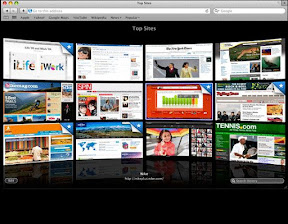
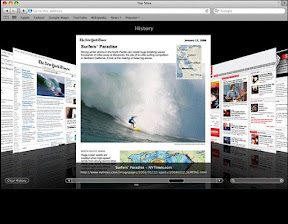
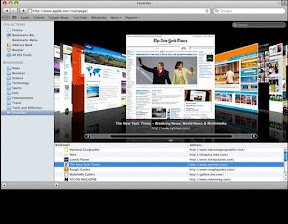
Here's a sneak preview of what Safari 4 features...


I love the fact that they have 'coverflow' in the browser and the whole 'cinematic' view when looking at the top sites you frequent.

The fruit might have just gotten it right this time - but only time will tell as while I type this blog entry, I'm having the browser downloaded.

Since it's the weekend and all, why don't you go ahead and grab this FREE GIFT from the fruit? It's FREE and there's nothing to lose :P I'll post my review of the browser sometime next week...

In the mean time, CHILL, download and have an AWESOME WEEKEND!

New Windows + Mac = 7 & a strange massaging exercise

Yesterday was one of those days where I got a little 'gloomy' - and so with EVERY gloomy day I've got, it usually ends with something that would cheer me up. Some people go the food method, some chocolates, some ice-cream, some binge shopping - you get the idea. Me? Gadgets and toys...

Since I didn't feel like spending any cash, I went ahead and downloaded Windows 7! Yes, Microsoft recently released a beta version of the touted latest and greatest version of the Windows Operating system.

To be honest, I've always been a Windows fan... then Apple came and decided to make all things nice and sweet - cuddly and just 'nice'. To make matters worse, Microsoft worked on an operating system called Longhorn and took literally the longest time... and finally got it released as Windows Vista - amidst all the hype - it was a product which didn't exactly live up to the expectations of the tech gerbils of the world. Some people say it was too slow, incompatible with older software, was cluttered up - my reasoning it was simple - Microsoft simply promised too much, couldn't meet up with expectations and as scholars around the world would tell you - people simply don't like too much change.

With Windows being the core software of Microsoft - coz without Windows, there'd be no operating system for Microsoft applications to run on - the largest and greatest software company on the face of this earth would be as good as dead.

So Microsoft went back to the drawing board and created Windows 7 - why 7? Apparently there's a whole explanation for it and Vista was 6 so Windows is 7 or something like that. If you REALLY want to know why, checkout this link.

I must say, Microsoft might have just out done themselves this time around. It's not just Vista with a new skin. It's Vista that was MEANT to be.

When requirements are A LOT less...
I don't want to delve too much into technical details (other sites or blogs would have spoken about it) - but Windows Vista if you recall - required quite a bit of souped up hardware - specific graphic cards, 2GB RAM etc for the ultimate Windows Vista performance... and guess what?


Tada! Windows 7 runs easily on my NETBOOK - and it's not Windows 7 with the bare-minimum experience - it's the whole glassy-aero effect, the bomb-diggidy - as Fabes would say.

You're talking about a 1GB Memory Machine, Intel Atom 1.6Ghz processor, 120GB drive and other basic items like built-in WiFi, Camera etc. Vista will NEVER run at full performance with such specs.


A pretty much plug and play experience
From the many blogs I read, Windows 7 seems to excel in areas of Plug and Play - plug-in something and it works. Since my Netbook didn't come with bluetooth, I bought a bluetooth dongle which required the cumbersome driver installation on XP and Vista - but on 7, it was PLUG - 15 seconds later - "Hardware is ready for use!".


Streamlined taskbar
The start menu and taskbar are now LOADS more intuitive - almost mac-ish looking. Running applications no longer show as icons and names, just icons. Multiple windows of the same application are stacked together instead of occupying space on the task bar the length of the Great Wall. Hover on one of the icons and out comes miniature windows showing what's currently showing on that application...

A mini conclusion...
It's just my first day of using Windows 7 Beta - and I must say, what other people have said about this Beta version; that it's as close as it gets to the release - I can most definitely agree. This is the bomb-diggidy... faster, more streamlined, much much easier to use, much much lower requirements, ZERO hiccups during installation... and that's just what I can see within this first 24 hours - can't wait for more discoveries... Try it out yourself today and download Windows 7 beta... - congratulations Microsoft!

A mini ending...
What is an ending to a blog entry without a strange picture. Here's one - caught in the studio this morning. Fabes experiencing what he calls the 'head baby massage' - performed by the GREAT Amrita - our producer :P


Drop me a comment if you've got something to say! :)